Interface
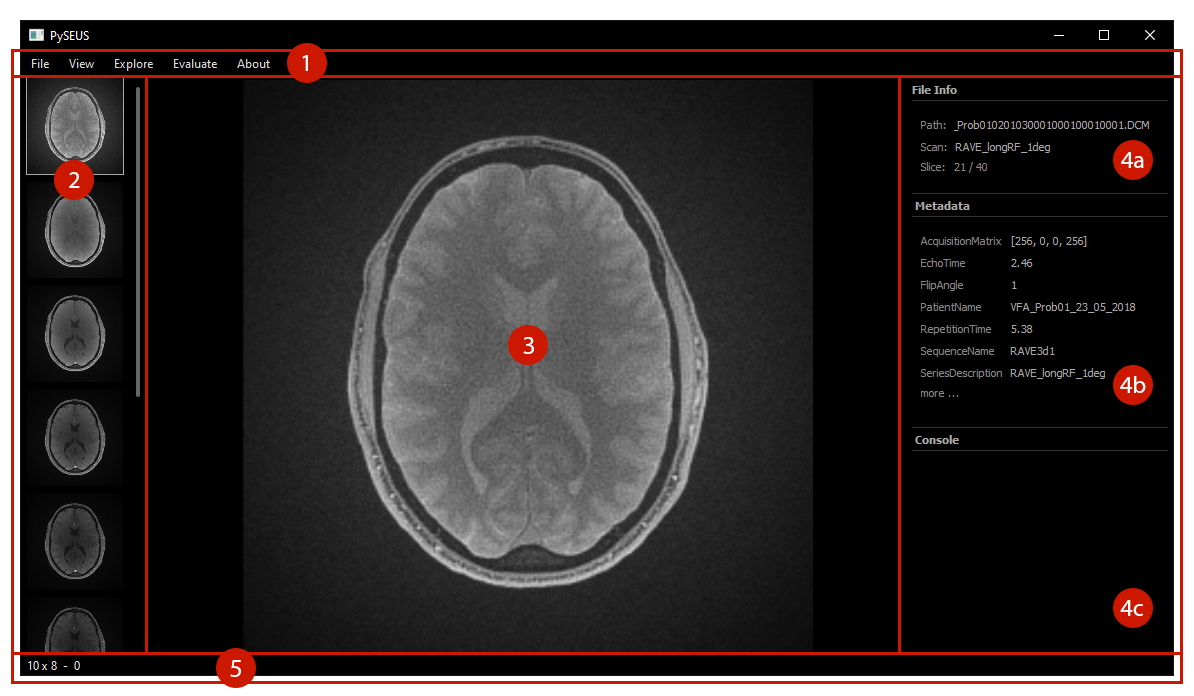
(1) Menu bar: The menu bar at the top allows access to all functions. See Navigation for the View and Explore menus and Evaluate for the Tools menu.
(2) Thumbnails: For datasets with multiple scans, thumbnails of each scan are dispalyed on the left. Clicking on a thumbnail will load the scan.
(3) Viewport: The viewport in the center displays the current slice. See Navigation for how to adjust the viewport.
Sidebar: The Sidebar collects various kinds of information.
(4a) File info: Basic information about the current dataset is displayed at the top. This contains the dataset path, the current scan and the current slice.
(4b) Metadata: If a dataset contains metadata, the most common items are displayed here. Clicking on more at the bottom will bring up a window with all available metadata.
(4c) Console: Generic text output (like from the area tool) is displayed here.
(5) Status bar: The status bar at the bottom provides contextual information. While hovering over the image viewport, the coordinates and value of the pixel under the cursor are displayed.